

Migrating to Shopify Without Losing Your SEO
Replatforming to Shopify is where hard-won rankings get quietly destroyed. Here's the checklist we use to move stores across without losing traffic.
Fady Ilias
Director, Web Divine

Replatforming to Shopify is one of the most common, and most costly, moments in an online store's life. Done properly, you carry your rankings across and barely feel a dip. Done carelessly, you can lose months or years of hard-won organic traffic in a single launch weekend.
The difference is almost never the platform. It's whether someone treated the migration as an SEO project, not just a design project. Here's how we approach it.
Why migrations lose rankings
Search engines have indexed your existing URLs, built authority against them, and send traffic to them. A migration changes your URL structure, your page templates and often your content. If you don't tell search engines how the old maps to the new, you get:
- Broken URLs: old pages returning 404s, taking their rankings with them
- Lost link equity: the authority built up on old URLs never passes to the new ones
- Duplicate or thin content: pages that read as new rather than as the established pages they replace
- Crawl confusion: search engines re-learning your whole site from scratch
Every one of these is preventable. The work is unglamorous, which is exactly why cheaper builds skip it.
The pre-migration checklist
Do this before you touch the new store. Migrating without a baseline is flying blind.
- Crawl the existing site. Capture every indexable URL, its title, meta description and status code. This is your source of truth.
- Pull your top pages. From analytics and Search Console, identify the URLs driving traffic, rankings and revenue. These are non-negotiable to preserve.
- Record current rankings. Snapshot your key keyword positions so you can measure the migration honestly afterwards.
- Inventory your content. Product pages, collections, blog posts, landing pages: everything that ranks or converts needs a home on Shopify.
- Note your backlinks. Know which external sites link to which pages, so those links keep landing on live URLs.
Mapping and redirects: the part that matters most
If you take one thing from this article, take this: every old URL needs a 301 redirect to its closest equivalent on the new store.
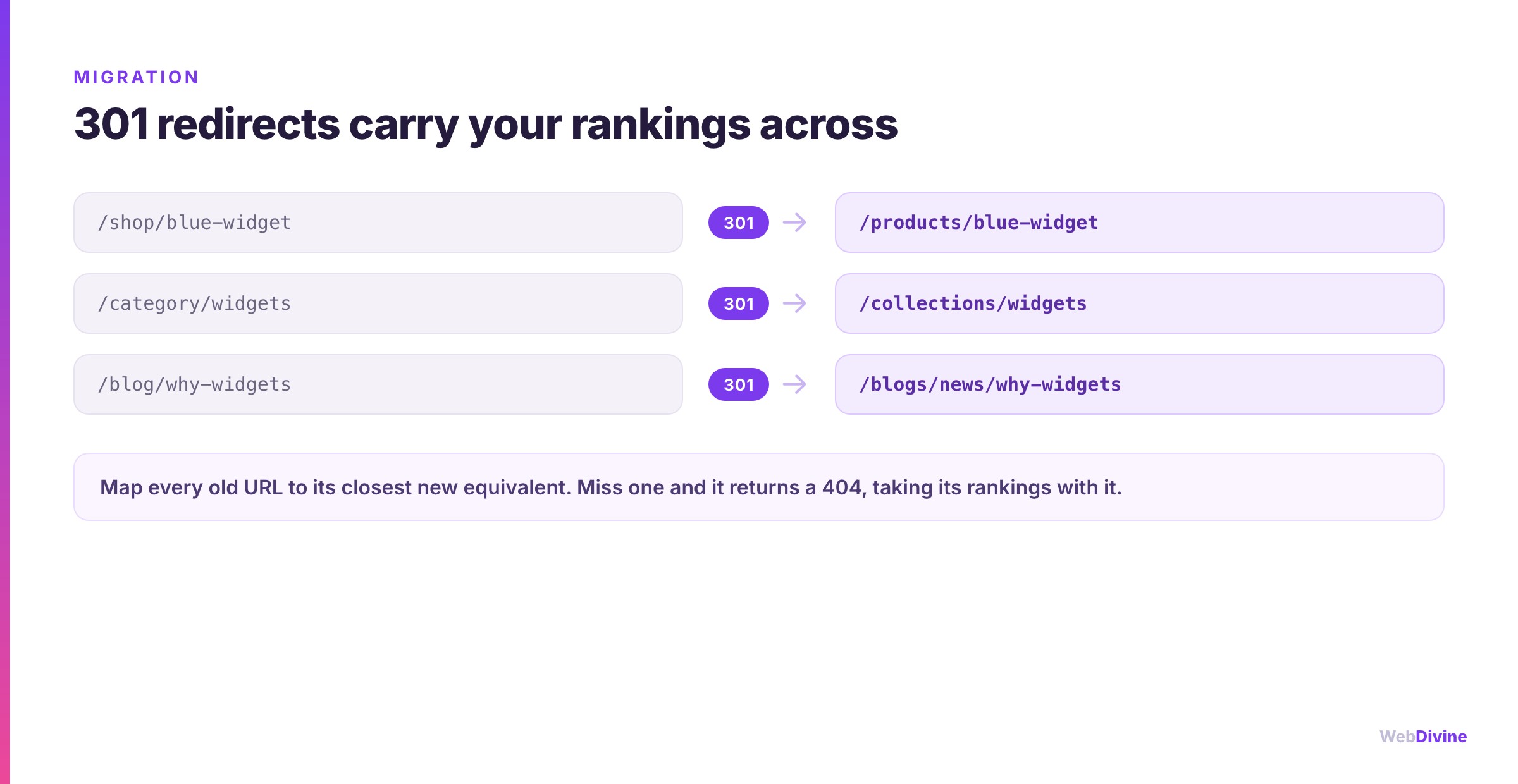
- Build a URL map. Old URL to new URL, row by row, for every page that matters. Shopify's structure (
/products/,/collections/,/pages/,/blogs/) will differ from your old site, so this mapping is real, deliberate work. - Use 301s, not 302s. A 301 is a permanent redirect and passes authority. A 302 is temporary and doesn't. Getting this wrong silently leaks ranking power.
- Redirect to the closest match. Send a discontinued product to its category, not the homepage. Relevance preserves value; lazy homepage redirects waste it.
- Avoid redirect chains. Old URL to new URL directly, not old to interim to final. Each hop dilutes and slows things down.
- Handle Shopify's quirks. Shopify appends
/products/and/collections/and can create alternate paths. Set your canonical URLs deliberately so you don't compete against yourself.
Shopify has a built-in URL redirect tool, and for larger catalogues you can import redirects in bulk. Whichever route you use, the map has to be complete before launch, not patched together afterwards from 404 reports.
Don't lose the on-page SEO either
Redirects protect your URLs. These protect the value on the pages themselves:
- Carry over titles and meta descriptions. Don't let a fresh theme silently regenerate generic ones. Migrate your optimised metadata deliberately.
- Preserve heading structure and body content. Rankings live in words. If product and category copy gets trimmed or templated during the redesign, rankings follow it down.
- Keep image alt text and sensible file names. Image search and accessibility both depend on it.
- Migrate structured data. Product schema, reviews and breadcrumbs help you keep rich results in search.
- Recreate your internal links. The links between your pages tell search engines what matters. Rebuild them, don't abandon them.
Launch day and after
- Generate and submit a new XML sitemap in Google Search Console so the new URLs get discovered quickly.
- Keep the old property live in Search Console to watch coverage and catch errors as they surface.
- Crawl the new site immediately to confirm redirects fire, pages return 200, and nothing important 404s.
- Watch Search Console for two to four weeks. A small, short dip is normal as search engines reprocess. A sustained drop means something's broken, usually a redirect gap.
- Fix 404s fast. Every unmapped old URL that shows up is a redirect you missed. Add it.
Common mistakes we're called in to fix
- Launching with no redirect map and hoping for the best
- Redirecting everything to the homepage instead of to relevant pages
- Rewriting all the content during the redesign and wondering why rankings fell
- Forgetting the blog, often a site's biggest source of organic traffic
- Leaving the new store set to "discourage search engines" (or Shopify's password page up) long after go-live
A migration should be invisible to your customers and nearly invisible to Google. If your traffic falls off a cliff after a replatform, that isn't bad luck. It's a step that got skipped.
Do it once, do it right
Migrations reward preparation and punish shortcuts. We plan them as SEO projects from the outset (mapping, redirects and metadata handled by senior people before a single page goes live) which is why brands like Tamburlaine Organic Wines and The Little Oak Company moved onto Shopify without surrendering their hard-won rankings.
See how we build and launch Shopify stores end to end, or meet the Shopify developers in Melbourne who'll run your migration.
Keep reading: not sure Shopify is the right call yet? Shopify vs WooCommerce for Australian stores compares them properly. Budgeting the move? How much a Shopify store costs in Australia.
Planning a move to Shopify? Talk to us first. The cheapest time to protect your SEO is before the new store is built, not after the traffic disappears.
Written by
Fady Ilias
Director, Web Divine
Fady Ilias is the director of Web Divine, a senior-led web design and development studio in Melbourne. He works hands-on with Australian businesses on conversion-focused websites, Shopify stores and custom web apps - senior people on every project, no junior hand-offs.
More about Web DivineKeep reading
More insights

Shopify vs WooCommerce for Australian Stores
Both platforms can run a great store. The right choice comes down to who owns the maintenance, what your total cost of ownership really is, and how you plan to grow.

Shopify vs a custom website: an honest guide for Australian businesses
Shopify suits most Australian online stores, but not all of them. Here is what it handles well, where its real limits are, what a custom build costs to own, and the middle paths that often beat both.
Shopify is retiring script tags: what store owners need to do before March 2027
Since 1 October, Shopify apps can no longer add script tags, and on 1 March 2027 existing ones stop loading altogether. Here is what that could break on your store, and how to check before it does.





















Let's talk about your project
Book a call with the people who would actually build it. You'll get straight answers on scope and timeline, and a fixed quote once the project is scoped.