

Shopify is retiring script tags: what store owners need to do before March 2027
Since 1 October, Shopify apps can no longer add script tags, and on 1 March 2027 existing ones stop loading altogether. Here is what that could break on your store, and how to check before it does.
Fady Ilias
Director, Web Divine
Shopify is phasing out one of the oldest ways apps add features to a store. Since 1 October 2026, apps can no longer create or change "script tags", and on 1 March 2027 Shopify will stop loading the ones that already exist.
Most merchants have never heard of a script tag, which is exactly the problem. If your reviews widget, live chat, pop-up or ad tracking quietly depends on one, it will simply stop working next March, with no error message and no warning in your admin. You will find out when the reviews disappear or your ad platform stops reporting sales.
The good news is that there is plenty of time, and for most stores the fix is a handful of checks and a few emails to app developers.
Checked against Shopify's developer changelog and Help Center as at 6 October 2026.
What a script tag is, in plain English
A script tag is a small instruction an app gives Shopify: "load this piece of JavaScript from my server on every page of the store". It was, for years, the simplest way for an app to put something on your storefront, such as a star rating under a product, a chat bubble or a tracking pixel.
Script tags belong to the app that created them, and they disappear when that app is uninstalled. They also bypass your theme entirely, which is part of why Shopify is retiring them: they are hard for merchants to see, hard to control, and can slow a store down.
The dates that matter
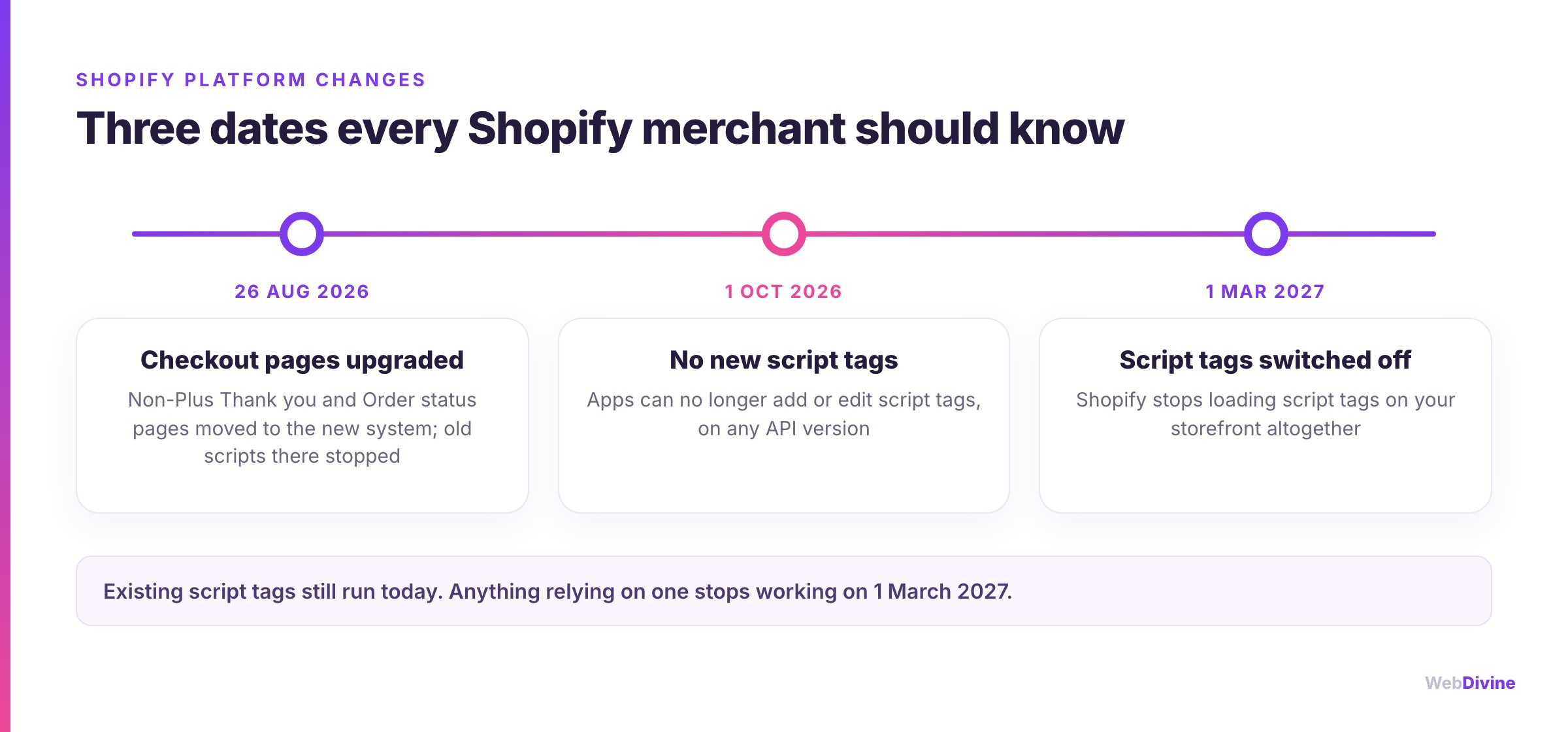
- 26 August 2026: the deadline for non-Plus stores to upgrade their Thank you and Order status pages. Stores that had not upgraded were moved across automatically, script tags stopped running on the Order status page, and the old "Additional scripts" box is not supported on the new pages. (Shopify Plus stores went through the same change in August 2025.)
- 1 October 2026: apps can no longer add a new script tag or edit an existing one. This applies on every version of Shopify's API, so an app cannot avoid it by sticking with an older version.
- 1 March 2027: Shopify stops loading script tags on storefronts altogether.
Shopify confirmed on its developer forum in late September that the timeline is fixed and that there are no exemptions for stores on older themes.
What could break on your store
Anything an app added to your storefront using a script tag is at risk. In practice, that tends to mean:
- Product reviews and star ratings
- Live chat and help widgets
- Pop-ups, email sign-up forms and announcement bars
- Social proof ("Sarah from Geelong just bought...")
- Loyalty, referral and affiliate tracking
- Delivery-date and shipping badges
- Older installs of Google, Meta or TikTok tracking
Well-maintained apps have already moved to Shopify's newer methods, and many will switch you over without you doing anything. The risk sits with apps that are no longer actively developed, custom apps someone built for you years ago, and setups nobody at the business remembers creating.
The tracking point deserves extra attention. If your purchase tracking breaks, your Google Ads and Meta campaigns lose the conversion data they use to optimise, and your ad spend starts working harder for worse results, often without anyone noticing for weeks.
Where that code needs to live now
Shopify has replaced script tags with two purpose-built alternatives, plus your theme itself.
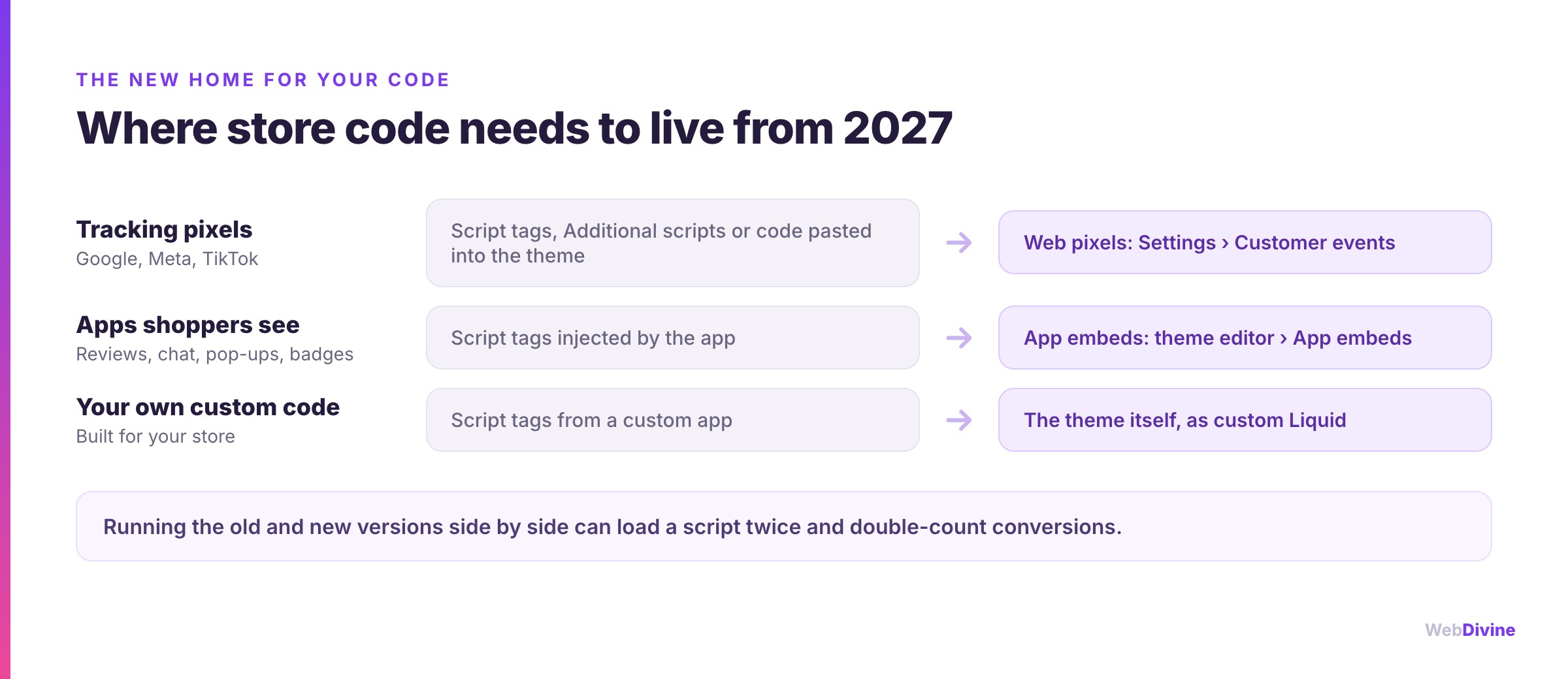
- App embeds are for things shoppers see. Apps provide them, and you switch them on in your theme editor under App embeds. They are switched on per theme, so they need to be on in your live theme, and they work with any theme.
- Web pixels are for tracking. They run in a protected sandbox, listen for standard shopping events such as viewing a product or adding to cart, and work across your storefront, checkout and post-purchase pages. You manage them under Settings → Customer events, either as app pixels (installed by an app such as Google or Meta) or as custom pixels.
- Your theme is the right home for any custom code built specifically for your store.

How to check your store
There is no single screen in the Shopify admin that lists your script tags, so the practical approach is to work from your apps outwards.
- List every app that shows something to shoppers. Go to Settings → Apps and note anything that adds reviews, chat, pop-ups, badges, upsells, loyalty or affiliate tracking.
- Ask each developer two questions. Does the app still use script tags? And is there an app embed or web pixel you need to switch on? Get answers in writing well before March.
- Check your theme editor. Open your live theme, go to Customize → App embeds, and switch on the replacements your apps provide. Check again whenever you change or update your theme.
- Look for doubles. Once a replacement is on, make sure the old version is gone. Running both can load a script twice and count every conversion twice.
- Audit your tracking. Under Settings → Customer events, confirm Google, Meta and any other ad platforms are connected as app pixels. Then remove old tracking code pasted into your theme or the old Additional scripts box, so purchases are not double-counted.
- Test a real order. Place a test purchase and confirm it shows up correctly in Google Ads, Meta and your analytics.
- Be wary of new apps. An app that has not migrated can no longer add script tags at all, so it may install successfully and then simply not appear on your store.
Strictly speaking, tracking code pasted directly into your theme is not a script tag, so it is not what switches off in March. Shopify still recommends moving it into pixels, and it is far easier to do both jobs in one pass.
While you are in there: other 2026 Shopify changes
Script tags are one of several clean-ups Shopify has made this year. Two others worth confirming:
- Shopify Scripts (the Script Editor used by Plus stores for checkout discounts and shipping rules) is a different thing with a confusingly similar name. Scripts stopped running on 30 June 2026, and the replacement is Shopify Functions.
- Managed Markets dropped support for duties paid on delivery (DDU) on 24 August 2026. Affected markets moved to duties paid at checkout (DDP). If you sell internationally, check your duties settings match what your customers are being told.
Our take
None of this is dramatic on its own. It is the kind of platform housekeeping that catches out stores where nobody owns the technical side, and the damage is invisible until it shows up in your sales reports.
If you would rather hand it over, our Shopify developers can audit your apps, theme and tracking, switch everything to the supported methods and confirm your conversion data is clean. It is the same care we put into migrations and new builds for ecommerce brands. If your ad tracking is in doubt, our Google Ads and paid social teams can verify it end to end.
Want a second pair of eyes? Talk to our Melbourne Shopify team or get in touch, and we will tell you plainly what on your store relies on script tags and what it will take to move it.
Sources
- Storefront script tags deprecation, Shopify developer changelog
- Script tag deprecation: storefront, Shopify developer docs
- Upgrading the Thank you and Order status pages, Shopify Help Center
- Pixels overview and migrating to pixels, Shopify Help Center
- Extend your theme with apps, Shopify Help Center
- Shopify Scripts deprecation, Shopify developer changelog
- Managed Markets ends DDU support, Shopify changelog
Written by
Fady Ilias
Director, Web Divine
Fady Ilias is the director of Web Divine, a senior-led web design and development studio in Melbourne. He works hands-on with Australian businesses on conversion-focused websites, Shopify stores and custom web apps - senior people on every project, no junior hand-offs.
More about Web DivineKeep reading
More insights

Shopify vs a custom website: an honest guide for Australian businesses
Shopify suits most Australian online stores, but not all of them. Here is what it handles well, where its real limits are, what a custom build costs to own, and the middle paths that often beat both.

Shopify vs WooCommerce for Australian Stores
Both platforms can run a great store. The right choice comes down to who owns the maintenance, what your total cost of ownership really is, and how you plan to grow.

How Much Does a Shopify Store Cost in Australia?
There's no single price for a Shopify store, but there are honest bands. Here's what drives the number up or down, and the ongoing costs most owners forget to budget for.





















Let's talk about your project
Book a call with the people who would actually build it. You'll get straight answers on scope and timeline, and a fixed quote once the project is scoped.