

WordPress security updates, September 2026: what to do now
Two WordPress security releases in six days, plus an Elementor Pro flaw hit by close to 190,000 attacks in five days. What changed, and what to do today.
Fady Ilias
Director, Web Divine
September was a busy month for anyone responsible for a WordPress website. WordPress shipped two security releases in under a week, and a few weeks earlier a critical flaw in Elementor Pro, one of the most popular page-builder plugins, went from patch to mass exploitation in a matter of days.
If your business runs on WordPress (and that includes WooCommerce stores, which are WordPress underneath), this deserves ten minutes of your attention today. Below is a plain-English rundown of what was fixed, who is genuinely at risk, and exactly what to do about it.
The short version: take a backup, update WordPress to 7.1.2 (or the patched release for your version), update Elementor Pro to 4.2.2 or later, then check you have not already been hit.
Checked against the official advisories as at 4 October 2026.
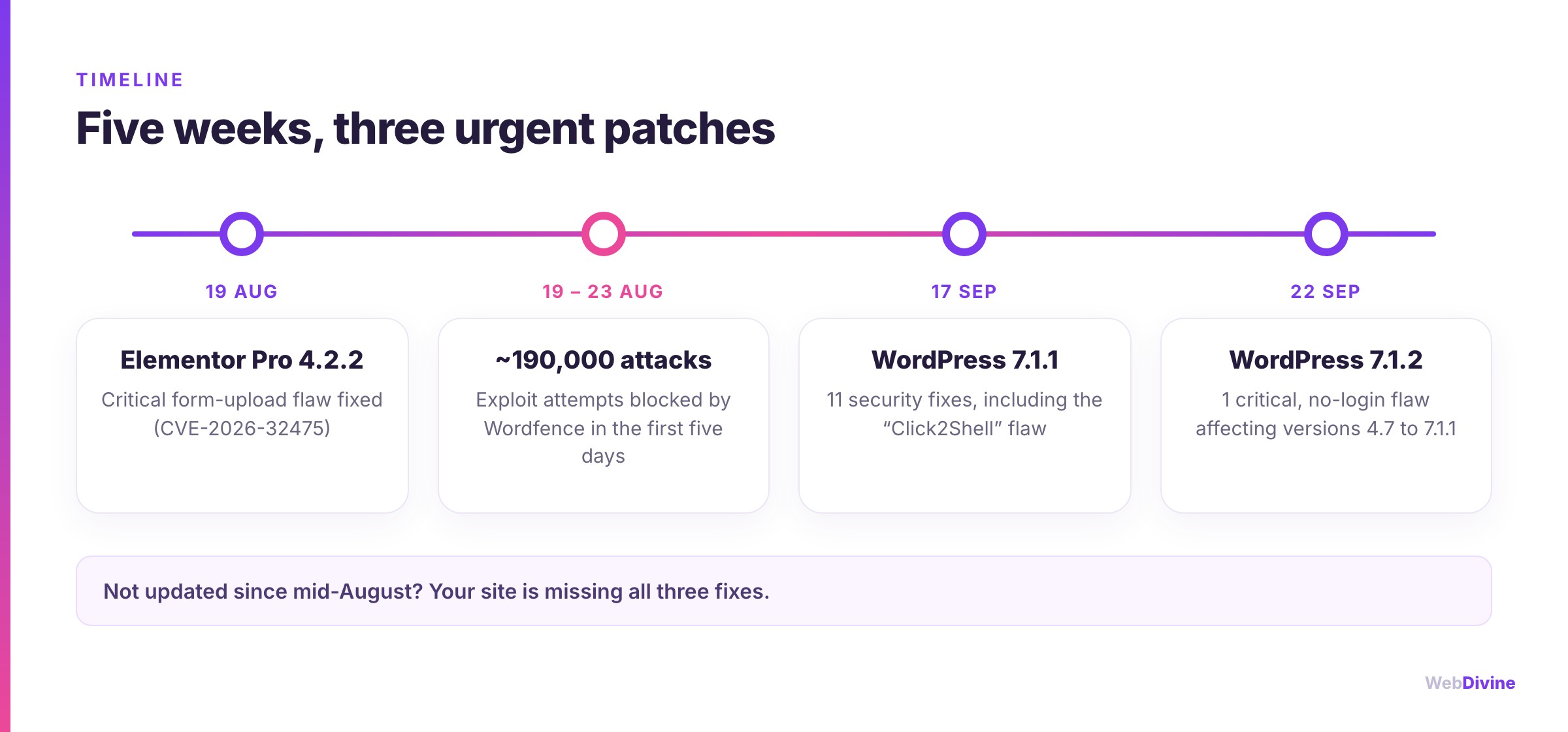
WordPress 7.1.1: eleven fixes, one with a name
WordPress 7.1.1 arrived on 17 September 2026 with fixes for 11 security issues, alongside a batch of regular bug fixes. Most were the narrow, permission-dependent bugs that turn up in any mature codebase. One stood out.
The researchers at pwn.ai who reported it called it Click2Shell. A specially crafted link could make WordPress install a theme from the official WordPress.org directory without anyone pressing Install. That sounds harmless on its own, because the theme is a genuine, listed one. The danger is what comes next: if the attacker chooses a theme that has its own security hole, the two can be chained together to run code on your server.
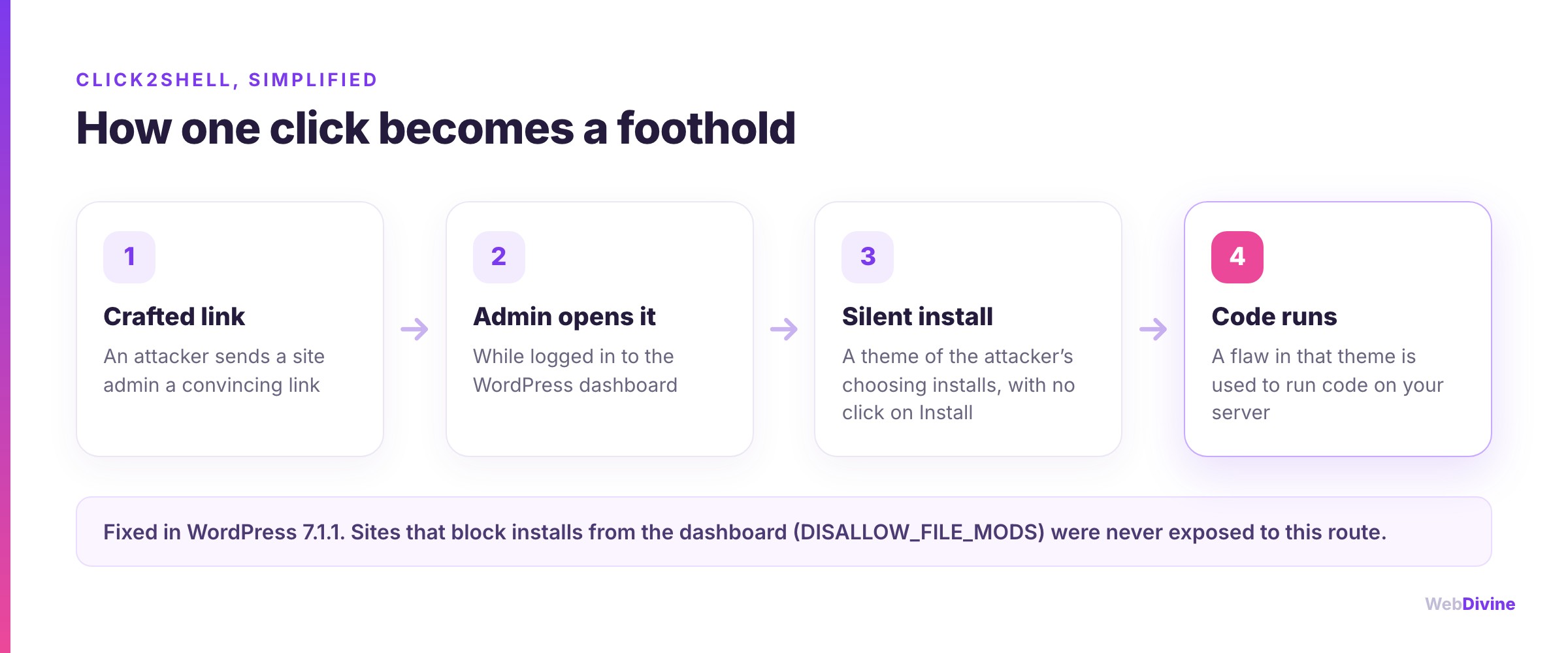
There is an important catch, and it is why this was not a mass-exploitation event: a logged-in administrator has to open the attacker's link. That makes it a targeted attack, typically delivered by a convincing email along the lines of "there is a problem with your website, click here to review it". Small businesses, where the owner is often the only admin and reads email in the same browser they use for WordPress, fit that profile uncomfortably well.
The same release also closed a stored cross-site scripting (XSS) hole in comments that needed no login at all. It is a useful reminder that the bugs which matter most are usually the ones an anonymous visitor can reach.
WordPress 7.1.2: one critical flaw, five days later
On 22 September, WordPress released 7.1.2 to fix a single vulnerability (CVE-2026-87902). It sits in the way WordPress decides which page template to load. In plain terms, an anonymous visitor could trick a site into loading a PHP file from somewhere it should never look.
Two details make this one serious:
- No login is needed. Anyone on the internet can try it.
- It has been there since 2016. Every version from 4.7 through 7.1.1 was affected.
Whether it leads all the way to an attacker running code depends on how your active theme is organised and how your server's PHP is configured, which is why WordPress describes it as conditional. "It depends on your setup" is not a comfortable position when the fix is one click away. At release there were no public reports of it being exploited, but that window tends to close quickly once a patch is public, because attackers study exactly what changed.
Elementor Pro: from patch to mass attack in days
The core releases followed an August scare in the plugin world. On 19 August 2026, Elementor released Elementor Pro 4.2.2 to fix a critical vulnerability (CVE-2026-32475) in its Forms widget. In versions 4.2.1 and earlier, an anonymous visitor could slip an executable file through a form's file-upload field and leave behind a webshell: a backdoor for running commands on your server.
Your site was exposed if it ran Elementor Pro 4.2.1 or earlier and had a published form with a file-upload field. Think "attach your resume", "upload a photo of the problem" or "send us your plans". On Australian trade, service and professional-services websites, that is an extremely common set-up.
Attackers moved fast. Security firm Wordfence reported blocking close to 190,000 exploit attempts in the first five days after the fix came out. That is the pattern worth understanding: a published patch acts as a map, and automated tools start scanning the internet for sites that have not applied it almost immediately.
One practical gotcha: Elementor Pro is a paid plugin and its updates are delivered through your licence. If the licence has lapsed, or it sits in a previous developer's account, the fix may never have reached your site.
Is your site affected?
You can see your WordPress version under Dashboard → Updates, or in the bottom-right corner of most admin screens. Plugin versions are listed under Plugins → Installed Plugins.
| If your site runs | You need at least | Where that leaves you |
|---|---|---|
| WordPress 7.1 | 7.1.2 | Current and actively supported |
| WordPress 7.0 | 7.0.6 | Patched, but plan the move to 7.1 |
| WordPress 6.9 | 6.9.9 | Patched, but plan the move to 7.1 |
| WordPress 6.8 | 6.8.10 | Patched, but plan the move to 7.1 |
| WordPress 4.7 to 6.7 | The latest release for your version | Courtesy fixes only, upgrade soon |
| WordPress 4.6 or older | No fix exists | Unsupported, upgrade urgently |
| Elementor Pro | 4.2.2 | Anything older is being actively attacked |
The WordPress security team back-ported these fixes to every version from 4.7 onwards as a courtesy, but only the newest release is officially supported. If you are several major versions behind, the patches buy you time. They are not a long-term plan.
What to do this week
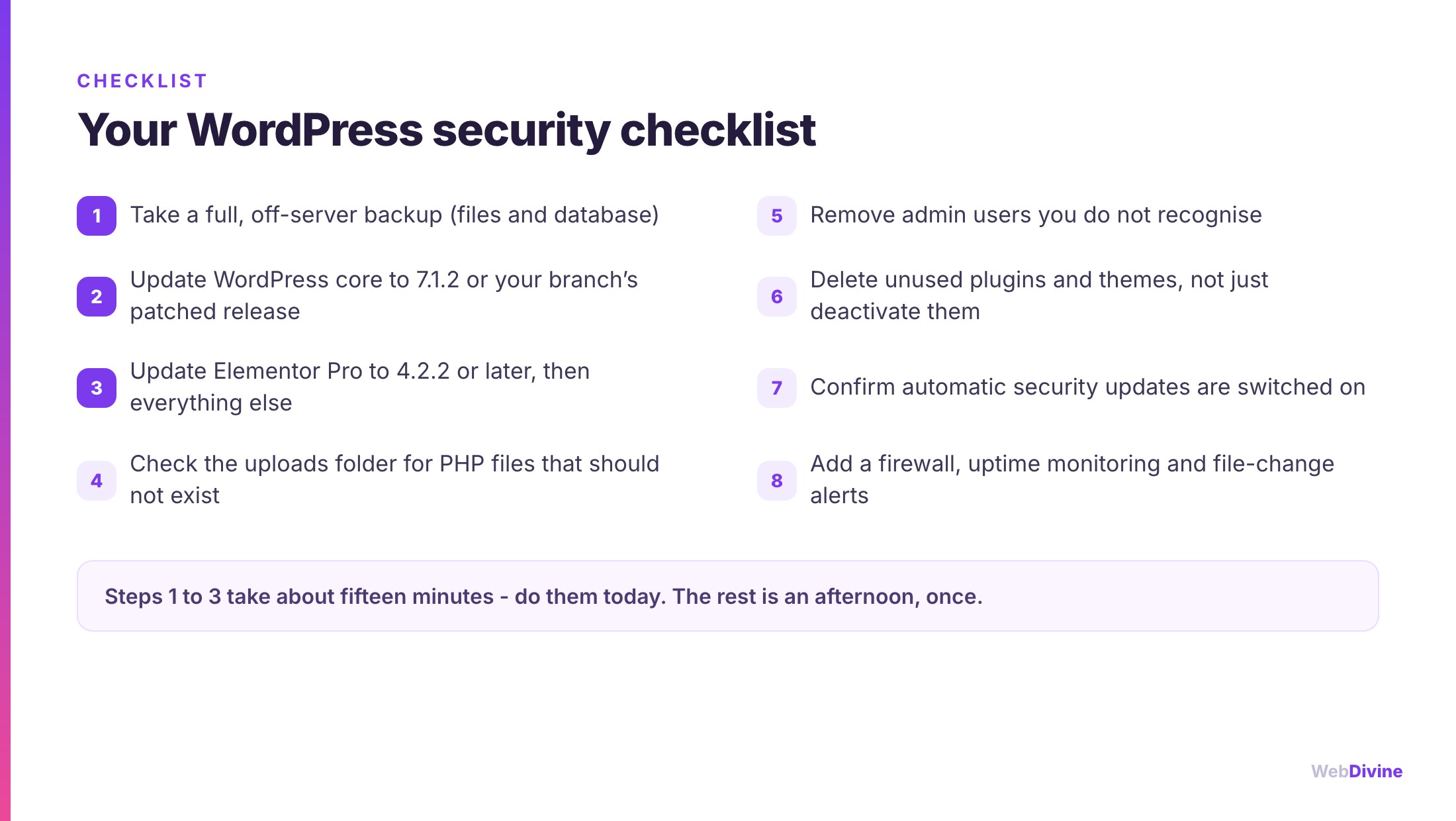
- Back up first. Take a full backup of your files and database, and store it somewhere other than your web server. A backup you have never restored is a hope, not a plan.
- Update WordPress core to 7.1.2, or the patched release for your version.
- Update Elementor Pro to 4.2.2 or later, then update your remaining plugins and your theme.
- Look for files that should not exist. Your uploads folder is for images and documents, never PHP. A
.phpfile inside/wp-content/uploads/elementor/forms/is a strong sign the site has been compromised. - Audit your admin users. Remove anyone you do not recognise, and anyone who has simply moved on from the business.
- Delete what you do not use. A deactivated plugin or theme is still sitting on your server and can still be exploited. If you are not using it, remove it.
- Confirm automatic security updates are on. WordPress installs minor security releases automatically by default, but hosts and previous developers often switch this off. Check it is working.
- Add a safety net. A web application firewall, uptime monitoring and file-change alerts mean you hear about a problem before your customers do.
If you do find something suspicious, do not just delete the file and move on. A backdoor rarely travels alone. Restore from a known-clean backup or have the site properly cleaned, then change every password, including hosting and database credentials.
How to tell if you have already been hit
Most compromised small-business websites do not announce themselves. Warning signs include:
- Admin accounts you did not create, or password-reset emails you did not request.
- Unexpected redirects, especially ones that only happen on mobile or when someone arrives from Google.
- Spam pages in Google. Search
site:yourdomain.com.auand look for content you never published: pharmaceuticals, gambling, or pages in another language. - A "Security issues" notice in Google Search Console, or a "This site may be hacked" label under your search listing.
- Files in places they should not be, such as PHP files anywhere in the uploads folder.
- A sudden slowdown or a warning from your host about resource usage, which can mean your server is being used to send spam or attack other sites.
Why this is a business problem, not just an IT one

It is tempting to treat website security as a technical chore. The cost of getting it wrong lands squarely on the business:
- Your rankings. Google warns searchers away from hacked sites, and injected spam pages can end up in your listings. Rebuilding the trust and traffic you earned through SEO can take months.
- Your customers' data. Contact and quote forms collect names, phone numbers and often more sensitive details. If your organisation is covered by the Privacy Act (at the time of writing, generally businesses turning over more than $3 million, plus private health service providers of any size), a breach that is likely to cause serious harm may need to be reported under the Notifiable Data Breaches scheme. Clinics should also read our guide to website requirements for medical and allied-health practices.
- Your sales. If you run a WooCommerce store, your checkout sits on WordPress too. Our Shopify vs WooCommerce guide explains how responsibility for this kind of upkeep differs between the two platforms.
The bigger lesson: every plugin is a promise you have to keep
None of this makes WordPress a bad choice. It runs a huge share of the web because it is flexible, and its security team clearly takes the job seriously, back-porting fixes nearly a decade into the past. But flexibility has a cost. Every plugin, theme and page builder you add is more code you are trusting, and more code somebody has to keep current.
That is why we push back on plugin-heavy builds, and why a cheap website so often turns out to be the expensive one (our website cost guide explains why). Before your next rebuild, it is worth asking whether you need a platform with this many moving parts at all. On the sites we design and build, ongoing maintenance is planned from day one rather than left until something breaks.
Not sure where your site stands? Run our free website health check for a quick read on performance, SEO and best-practice basics, or talk to us and we will tell you plainly what is out of date, what is exposed and what it would take to fix it.
Sources
- WordPress 7.1.1 release notes, WordPress.org
- WordPress 7.1.2 release notes, WordPress.org
- Click2Shell technical analysis, Patchstack
- Critical Elementor Pro flaw exploited to take over WordPress sites, BleepingComputer
- Elementor Pro vulnerability records, Wordfence Intelligence
- Notifiable Data Breaches scheme, Office of the Australian Information Commissioner
Written by
Fady Ilias
Director, Web Divine
Fady Ilias is the director of Web Divine, a senior-led web design and development studio in Melbourne. He works hands-on with Australian businesses on conversion-focused websites, Shopify stores and custom web apps - senior people on every project, no junior hand-offs.
More about Web DivineKeep reading
More insights

Migrating to Shopify Without Losing Your SEO
Replatforming to Shopify is where hard-won rankings get quietly destroyed. Here's the checklist we use to move stores across without losing traffic.

Shopify is retiring script tags: what store owners need to do before March 2027
Since 1 October, Shopify apps can no longer add script tags, and on 1 March 2027 existing ones stop loading altogether. Here is what that could break on your store, and how to check before it does.

Shopify vs a custom website: an honest guide for Australian businesses
Shopify suits most Australian online stores, but not all of them. Here is what it handles well, where its real limits are, what a custom build costs to own, and the middle paths that often beat both.

















Let's talk about your project
Book a call with the people who would actually build it. You'll get straight answers on scope and timeline, and a fixed quote once the project is scoped.